



The year is ending and it's time to take stock! In 2019, just like what I've been trying to do since I created this blog in 2013, I scoured the web to offer you websites and tools of all kinds, designed to simplify your life, make you laugh, help you use your computer better...
Of course, not all of them were of equal quality and that is why I decided to offer you a selection of the tools and websites that left the biggest impression on me in 2019 !
Here is a selection, listed in chronological order, of what you shouldn't have missed on Byothe.fr in 2019:
1. Remove.bg: Easily cut out images online

In 2014, I introduced you to Background Burner, a fairly effective tool for free online image clipping. Since then, not much has been done in the field of online photo background removal.
But that was before a new tool appeared: Remove.bg. As its name suggests, Remove.bg (for Remove Background) allows you to remove the background of a photo. If you like to manipulate photos, it can be extremely practical to remove the background of a photo in order to keep only the character…
2. Canvas, the online drawing application from Google

Named Google Canvas, this online application is available at the following address: canvas.apps.chrome. Don't panic, contrary to what this URL seems to indicate, this drawing tool works in any browser that supports the WebAssembly standard. The application will therefore work perfectly on Chrome (of course), Firefox, Edge and Safari.
3. Use The Keyboard: A site that lists keyboard shortcuts (Windows and Mac) for programs and websites

But recently, I came across the site Use The Keyboard, whose goal is to offer you lists of shortcuts (Windows or Mac) classified by applications or websites…
4. Youzik, to convert YouTube videos to MP3

There are several types of online tools for which there are a multitude of alternatives and this is for example the case of YouTube video to MP3 converters.
Youzik is a tool whose sole purpose is to allow you to download the audio track of a video taken from YouTube in MP3. As is often the case with this type of tool, its operation is very simple!
5. Photopea, a real free alternative to Photoshop in your browser

Photoshop is without a doubt the cream of the crop when it comes to photo editing. It is both a very complete and complex software, and extensive practice is required to achieve a good level of mastery. There are a number of free alternatives, including The Gimp which allow you to edit photos without breaking the bank.
Photopea is a free and online alternative to Photoshop! Its advantage beyond its free nature, lies in the fact that there is nothing to install!
6. SummarizeBot: Get a relevant summary of a text or article in just a few seconds

We all dreamed of it, SummarizeBot did it: automatically summarize a text or an article to keep only the essentials. No need to read dozens and dozens of lines, this bot will serve you on a platter the substantive marrow of any text!
Indeed, it is a bot based on a winning triplet of current technologies, namely Machine Learning, Artificial Intelligence and Blockchain. Thanks to its algorithm and the power of these technologies, it will process for you on demand and in just a few seconds, any text (that you provide using its URL) to keep only a brief summary, keywords and the most relevant sentences.
7. Send a file without any size limit with ToffeeShare

Sharing large files has been a problem on the web for a while now. Most email systems impose size limitations to avoid cluttering inboxes, but also to avoid potentially dangerous files.
ToffeeShare is a file sharing system that works in peer-to-peer, that is to say that the system tries to establish the most direct connection possible between the person who sends the file and the one who will receive it. Thanks to this technical choice, the service can afford to remove any limitation on the size of the file you wish to transfer….
8. Landscape: Resize your photos for social media

If you use social media a lot, you probably know that photos and images play a vital role in making your profile or page attractive and boosting your posts. In the mass of messages published every day, it is important to catch the eye and stand out visually.
Landscape is a free website that allows you to resize your images to fit the needs of different social networks!
9. ColouriseSG colorizes your black and white photos using deep learning

Every day, the themes of artificial intelligence and deep learning are making enormous progress. These developments, when used well, make it possible to do incredible things.
This is the case, for example, of ColouriseSG, a free online tool that uses deep learning to colorize black and white images. Of course, the idea is not to find the original result, but to assign plausible colors to an image that is devoid of them.
10. DownloadGram to easily download Instagram photos or videos
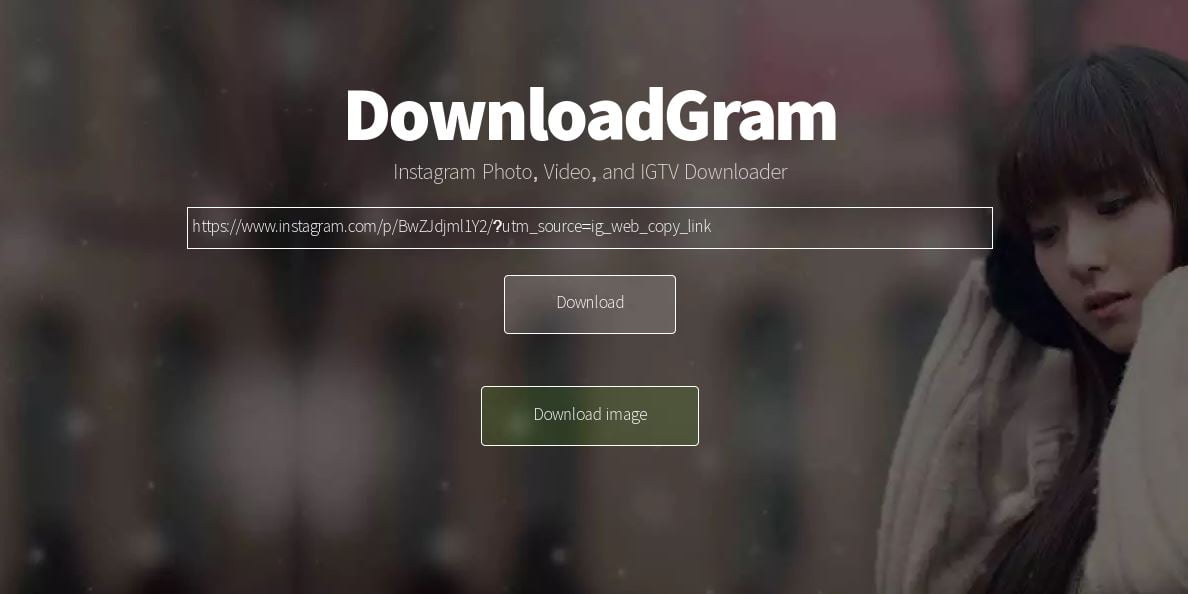
With Instagram it is impossible to download photos from the social network… whether they are yours or those of a third party.
However, There are various solutions to get around these limitations.. This is the case for example of the site Download Gram which is the best solution I have tested so far to download photos from Instagram.
What is appreciable is that DownloadGram is very easy to use and works well on both computer and mobile.
11. CopyPasteDesign, a site to annotate, draw, write… on your screenshots

Whether for my job or for this blog, I take screenshots on my computer several times a day. It's a good way to explain a manipulation to someone or to report a bug with a good illustration to support it.
CopyPasteDesign, East a free online tool which helps to overcome the weaknesses of the Windows Snipping Tool without having to use Paint or other drawing software.
12. Hopla: create shared, collaborative and private online photo albums!

With the advent of smartphones, digital photography has exploded. Every event, every outing, every trip… everything is an opportunity to take photos and often too many photos! But what matters now is sharing and showing your photos to others. This is done quite naturally on social networks, especially Instagram and Facebook, but it can sometimes be necessary to share photos in a restricted, protected and private setting!
This is exactly what Hopla does.
Hopla is a platform that will allow you to create shared, collaborative and private online photo albums!
13. The free dictionary of the French Academy is now online!

The French Academy is a large institution whose primary function is to standardize and perfect the French language. In order to carry out this vast program, 40 elected members sit to ensure the (gentle) evolution and preservation of our beautiful language.
As a result, one of the missions of this academy is to publish a dictionary aimed at collecting and fixing the use of French in France: the famous Dictionary of the French Academy, the first edition of which was published in 1694!
And the good news is that almost 330 years later, in February 2019, the Académie française put this famous dictionary online in its 9th edition!
14. RecordScreen.io allows you to record your screen without installing anything!

There are many software programs that allow you to record your computer screen, but few are as convenient as the following solution!
Indeed, RecordScren.io is a website that does not require any installation (neither browser extension nor executable) to start recording your computer screen.
15. PlayClassic.games: Play old video games for free in your web browser

If in a few decades video games have made astonishing progress in terms of both graphics and content, the flavor of some old video games remains unmatched for some of us. It must be said that at the time everything had to be invented! It was therefore necessary to be original to create new games... while being content with the graphic possibilities of the moment.
But the good news for fans of vintage games is that there is the PlayClassic.games site, whose purpose is to provide you with a selection of classic video games from the PC or console worlds for free in your browser.
16. Zulu, an online, ergonomic and collaborative favorites manager!

Developed by two designers who were tired of managing their bookmarks with the unsuitable and outdated tools of web browsers, Zulu aims to simplify your life when it comes to your web bookmarks.
So, with Zulu, just like with your browser, you will be able to save the links of the sites that you visit regularly and access them from anywhere... and to top it all off, the site offers a much more visual interface.
17. Monkkee lets you keep a private, free online diary!

When I think of “Diary,” I see vivid images in my mind of a young girl lying on her bed, writing in a notebook that closes with a small lock, her deepest thoughts about life, love, and her friends…
This archaic and somewhat macho vision of the diary is no longer relevant since today, there is an online, private and free alternative called Monkkee! This version 2.0 of the diary is therefore far from the clichés that I mentioned above.
Monkkee is therefore an online note-taking system, ultra-secure and 100% private.
18. Online OCR allows you to extract text from an image or PDF

In recent years, Optical Character Recognition (OCR) tools have made enormous progress. These tools work in stages to recover everything written on an image (or PDF).
Online OCR is as its name suggests an online ROC tool. This free tool works in 46 languages including French and since it is online, it does not require any installation.
19. PineTools, the Swiss army knife of online tools!

To your bookmarks! The site that I am going to present to you is a gold mine full of small utilities of all kinds that will simplify your life.
Indeed, PineTools is a website that brings together nearly 150 free online utilities grouped into 9 categories: maths, colors, texts, numbers, dates, images, chance, etc.
20. Easy PDF, a very good multifunctional online PDF converter

There are many free PDF converters online, but not all of them are equal. Personally, I have a slight preference for I love PDF which is really very effective, but Easy PDF is really a good alternative.
Indeed, what is pleasant with Easy PDF beyond its clear and refined interface, is that the site offers a wide range of tools intended to manipulate PDFs and to carry out file conversions whether in the direction of document to PDF or PDF to document.
21. Resoomer: a free site to summarize any text in one click!

Since I created Byothe.fr in 2013, my goal has always been to present you with sites and tips whose purpose was to simplify your life. With Resoomer, we fall right into this theme since this free site will help you summarize any text in a single click!
This site works with any argumentative text, whether it is an article, a scientific text, a historical text, an argument... but it will not work with novels, narrative texts, dialogues... If you have already done the exercise of summarizing a text, you know how tedious and delicate it can be... you have to be brief while keeping the substantive marrow that makes the text in question interesting.
22. Links List, to create and share a list of links

There are a multitude of reasons to share a list of links, whether it's for your Christmas gift ideas, a selection of must-have items to share with your friends, a list of websites for carrying out a project or even links to photo URLs... in short, you probably have a good reason to do it!
Links List is a 100% free web service whose sole purpose is to allow you to create lists of links and share them!
23. Trace, a free online tool to remove the background from your photos

Online image clipping is a topic that I have been covering regularly on this blog since its creation. I have presented several tools to remove the background on your photos such as Remove.bg, Background Burner or Clipping Magic! All of them have more or less advanced features and options and my preference is Remove.bg. But that was before I discovered Trace.
Trace is a very easy to use and very powerful tool that will remove the background of your photo to keep only what it has identified as the foreground.
24. Redacted, a free online tool to blur your images!

What is of course the Internet is that there is almost always a solution to your problems! So, if you need to blur or anonymize a photo or image, there are several sites that allow you to do it without having to use complex software or tools.
And that's exactly what Redacted allows you to do.
This free tool lets you censor parts of an image, adding blurry, pixelated, or black areas to specific locations.
25. Columns, a task and todo list manager organized in columns

There are many list applications that allow you to manage a whole bunch of task lists and todo lists that punctuate our daily lives: shopping lists, lists of movies to watch, list of tasks for the day, list of books we have read... lists are necessary, and today we present a new free online application that is based on a simple concept: display your lists for free in columns next to each other... and it is an online tool (on the web...).
For the management of this blog, I use list managers quite extensively and I must say that Columns is quite attractive!
If you are feeling nostalgic or missed it, feel free to check out the Best Of Tools and Websites 2018 !











Thanks for these finds!