



Pollo AI simplifies video generation with AI by making it easy for anyone to turn simple text messages into captivating videos. Whether you're a marketer, teacher, or content creator, this AI video generator simplifies the process, eliminating the need for technical expertise or expensive software.
With its intuitive interface and advanced AI, Pollo AI interprets your text messages to create high-quality AI videos in just minutes. This step-by-step guide shows you how to turn text into AI videos with Pollo AI and introduces you to the highlights of this powerful AI video maker.
Introduction to Pollo AI
Pollo AI is an all-in-one AI video generator that integrates several leading video models such as Google Veo 3, Wan 2.2, PixVerse V5, Kling AI, Vidu AI, Luma AI, etc. Plus its own flagship video model Pollo 1.6.
Its text-to-video feature lets you easily turn simple text messages into professional-looking videos. Using advanced AI technology, Pollo AI interprets entered text to produce visually appealing videos with seamless animations and transitions.
The video creation process is simple and accessible to both beginners and professionals. Users can enter a suggestion or idea and customize video options such as aspect ratio, duration, and resolution.
Whether you're creating promotional content, educational explainers, or social media videos, Pollo AI lets you efficiently generate impactful AI videos.
How to Generate Videos from Text Prompts with Pollo AI
You can follow this step-by-step guide to easily create stunning AI videos using text prompts:
Step 1: Visit the Text to Video page
Log in to Pollo AI and access its tool text to video AI.

Step 2: Select your favorite model
Now you can choose your favorite video template. Popular templates include Google Veo 3 (realistic outputs with natural sound), Hailuo 02 (extreme physics simulations), PixVerse V5 (smooth and expressive movements), and many more. Each AI video template perfectly meets your specific video needs.

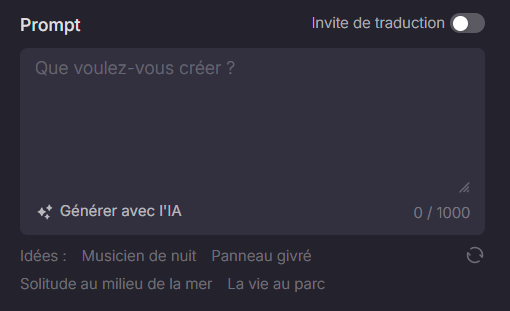
Step 3: Enter text prompts
Enter a text describing what you want Pollo AI to create for you. You can also generate a text with the AI explaining your vision. You can also find ideas to inspire you.
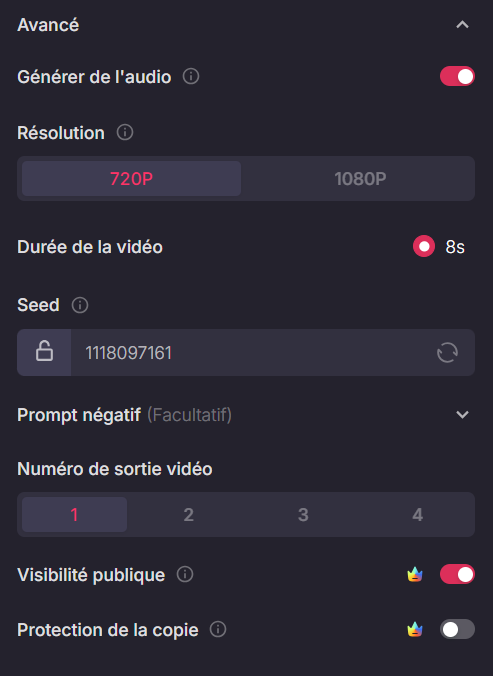
Step 4: Adjust other video options
For example, if you choose the Google Veo 3 model, you can choose customizable settings such as Generate Audio, Video Resolution, Video Duration, and even enter a negative prompt.
By carefully choosing these video options, you can generate an AI video that better matches your imagination.
Step 5: Create your video
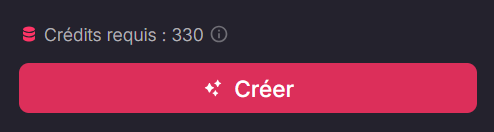
After selecting all these customizable options, click “Create” and wait. Pollo AI will analyze your entered text and generate your final AI video based on all your options. Finally, if you’re satisfied with the result, download the video to your device or share it instantly on social media.
Why choose Pollo AI for video generation?
Here are some of the highlights that set Pollo AI apart from other AI video generators:
Multiple AI video models available
You can test several cutting-edge video models on this all-in-one AI video platform. In addition to its flagship product Pollo 1.6, it also offers access to other advanced models, such as Google Veo 3, Kling AI, Wanx AI, Runway, Seedance, Hailuo AI, Vidu AI and much more. The creativity on Pollo AI is endless.

Various video generation features
In addition to its text-to-video conversion AI, Pollo AI also offers AI image to video, video to video AI et consistent character video It includes a wide variety ofvideo effects entertaining to create interesting visual content, as well as a AI Animation Generator to create anime in different styles.
Additionally, you can try the advanced version AI Avatar Generator in Pollo AI to create a natural speaking avatar without the need for pre-training. The tool imitate movement can even make the subject of your photo move or dance according to the patterns you have chosen without annoying distortion.
You can access all the best AI models and professional AI tools in Pollo Canvas to seamlessly refine and tweak your AI creation. It's an all-in-one canvas with endless possibilities.
Free version
Pollo AI offers a free version that lets you explore its generation features with a limited number of credits. Paid plans offer more advanced features, such as more camera movement options and watermark-free output.
High quality video outputs
Pollo AI not only delivers creativity, but also high quality. It generates high-resolution AI videos up to 1080p, with crisp visuals that will impress your audience, whether for social media sharing, presentations, or promotional marketing materials.
Conclusion
Pollo AI's text-to-video AI simplifies video creation, effortlessly transforming simple text prompts into stunning AI videos. Its intuitive interface and powerful AI make professional-quality video creation accessible to everyone, with no professional editing skills required.
Ready to create your own AI videos? Start using Pollo AI today and bring your ideas to life in just minutes!